← AI prompts · Instagram trending · Glow portrait
Glowing cinematic portrait AI prompt
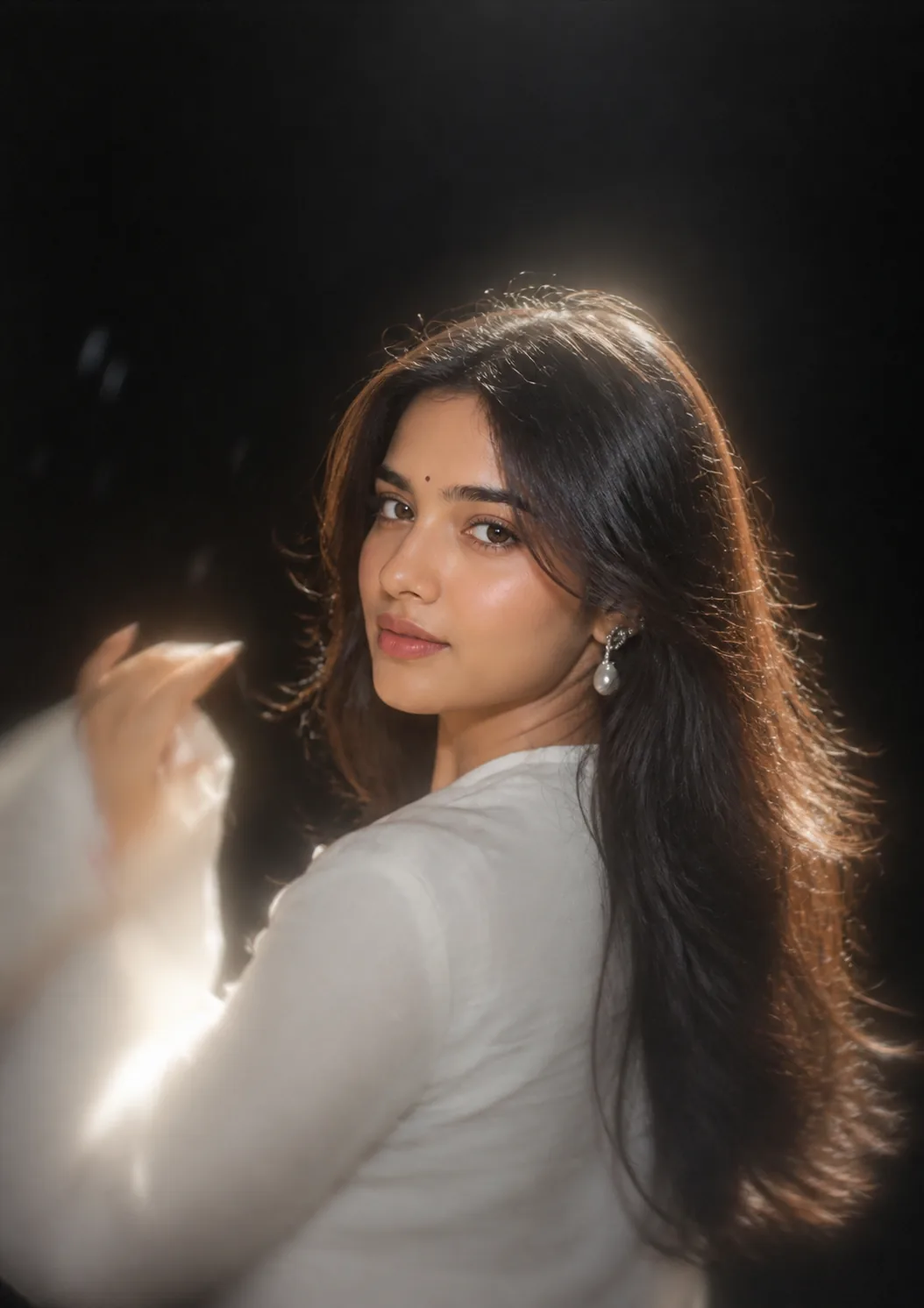
The glow portrait trending on Instagram right now — a black background, a strong backlight burning through the edge of the hair, and that over-the-shoulder look. Copy the free ChatGPT & Gemini prompt below and keep your own face.
Upload a bright photo, not a moody one. This prompt's whole job is to add dramatic low-key lighting. It can only do that convincingly if it can see your face clearly to start with — a flat, evenly lit photo taken near a window works far better than one that is already dark.
There is nothing to set here: ChatGPT, Gemini and Nano Banana expose no transformation strength, no identity strength and no beautify toggle. You ask for the same thing in words — keep my exact face, relight me, do not restyle my features. Only image-to-image apps that actually show a denoise or strength slider give you a number to move, and there 0.20–0.35 is a low, safe start. Beautify, meanwhile, belongs to the camera app that shot your reference.
About this prompt
Most AI portrait prompts describe a place — a café, a blossom tree, a red studio. This one describes a light, and that is the whole trick. Everything people react to in the trending glow portrait is one lamp: a strong backlight sitting behind and slightly above the subject, aimed at the back of the head, so it burns a bright rim through the edge of the hair and separates her from a background that stays almost black.
Photographers call that a rim light or a hair light, and it is the oldest trick in portrait lighting. It is also the one AI image models are least likely to give you unless you name it. Ask for a "dramatic dark portrait" and you will get a flat, front-lit face on a dark grey background. Ask for a backlight from behind and above with a glowing rim around the hair, and you get this.
The second half of the prompt exists to stop the first half going wrong. A strong backlight naturally leaves the face in shadow, so there is an explicit instruction for a gentle warm key light on the face. Without it the model happily silhouettes you, which looks dramatic and is useless as a picture of a person.
How to use it
- Tap Copy prompt above.
- Open ChatGPT (image generation), Google Gemini or Nano Banana in image-to-image / reference mode.
- Paste the prompt and attach one sharp, evenly lit, front-facing photo — not one that is already dark or filtered.
- Ask to be relit, not redrawn — none of these three tools has a strength or beautify control, so type keep my exact face, relight me, do not restyle my features. Where a denoise or strength slider does exist, keep it low, 0.20–0.35.
- Generate at a vertical ratio — 4:5 or 2:3, 1080 px wide or larger.
The three ways this goes wrong
The background is grey, not black. Almost always the reference photo — the model is still carrying a bright wall or a window through. Crop your photo tighter around head and shoulders before uploading, and repeat that the only light sources are the backlight and the soft key on the face.
There is no glow. The prompt is being read as ordinary front lighting. Say backlight and rim light explicitly, and add that the background must stay darker than the subject. The glow only exists as a contrast between a bright hair edge and a dark field behind it — if the background lifts, the glow disappears.
The face is blown out or lost. Too much backlight, not enough key. Ask for a stronger warm key light on the face and regenerate. This is also where identity drifts, so compare the result with your original photo before you accept it.
Making it yours
- The white top is doing real work — it catches the rim light and bounces it back up under the chin. A dark top kills that. Keep it white or a very light neutral.
- Pearl drop earrings are in the prompt because small specular highlights read beautifully in low-key light. Any small shiny earring does the same job.
- Want it warmer? Change "soft spotlight glow" to "warm golden spotlight glow". Want it cooler and more editorial? Say "cool white spotlight".
- The empty space above the head is deliberate — it is what makes the crop feel like a magazine page rather than a selfie. Do not crop it out afterwards.
- This works for men too. Keep every lighting line and swap the wardrobe and hair description for your own.
If you like the dark, dramatic look, the red cinematic studio portrait and the candlelight close-up are the other two low-key prompts here, and the moody restaurant portrait uses the same shallow depth of field in a real location. For something softer, try the spring cherry blossom portrait, or the traditional saree portrait.
See every look in the Instagram trending AI photo prompts roundup, or browse the full AI photo prompts library. There is also a stylised 3D avatar portrait if you want a profile picture instead.
Frequently asked questions.
What is the glowing portrait AI prompt?
How do I make a glowing portrait in ChatGPT?
Why is my background not fully black?
How do I get the glow in the hair?
What kind of photo works best as the reference?
Is this glowing portrait prompt free?
Keep going
More trending AI photo prompts.
Copy-paste prompts blowing up on Instagram — all free, all keep your face.