The short version: paste any prompt below into ChatGPT (image mode) or Google Gemini, attach one clear photo of your face, and generate. Every prompt is free, keeps your identity, and takes seconds. New trending prompts get added here as they drop — bookmark this page.
AI photo prompts are the biggest thing on Indian Instagram this year. Instead of editing a photo for an hour, you paste a few lines of text, add your own selfie, and the AI builds the whole look — a 1980s film-era scene, a low-key studio portrait, a Ganesh Chaturthi festival image, even a new hairstyle — with your real face intact. The searches for "trending AI photo prompt" and "ChatGPT photo editing prompts" have shot up through 2026, and this page is where we keep the ones actually worth your time.
Each card below links to the full prompt with a one-tap copy button. They are written for identity-preserving generators — ChatGPT, Gemini, Nano Banana — so the wording locks your face and only changes the styling.
New: ten ChatGPT 80s prompts, each a different Indian scene from a 1974 garden picnic to a 1988 city street, all written to keep your own face.
The trending prompts right now

Retro temple AI photo prompt, 1982
A 1982 family-album portrait in a stone temple courtyard: brass lamps, afternoon sun and a faded print.
Copy the prompt →
Retro cafe AI photo prompt: a 1986 coffee house
A 1986 Indian coffee-house portrait: marble table, ceiling fans and compact-camera flash.
Copy the prompt →
1978 vintage car AI photo prompt
A 1978 portrait leaning on a vintage sedan: flared trousers, wide collars and warm afternoon film.
Copy the prompt →
Retro hill station AI photo prompt — 1985 mountain road
A 1985 hill-station holiday snapshot: full length on a winding mountain road, faded film and a red date stamp.
Copy the prompt →
1980s photo prompt for ChatGPT
Your photo, reimagined as a 1985 portrait-studio print — padded shoulders, pleated trousers, film grain and a red date stamp.
Copy the prompt →
Ganpati saree portrait
Seated beside Bappa in a navy saree, with a real gap between you and your eyes meeting his. Warm temple light, diyas in the foreground.
Copy the prompt →
Crimson overcoat portrait
Deep red backdrop, black wool overcoat, one warm key light. The red stays behind you, so your skin stays yours.
Copy the prompt →
All-black suit portrait
Black suit, black shirt, black background — and gold as the only colour in the frame.
Copy the prompt →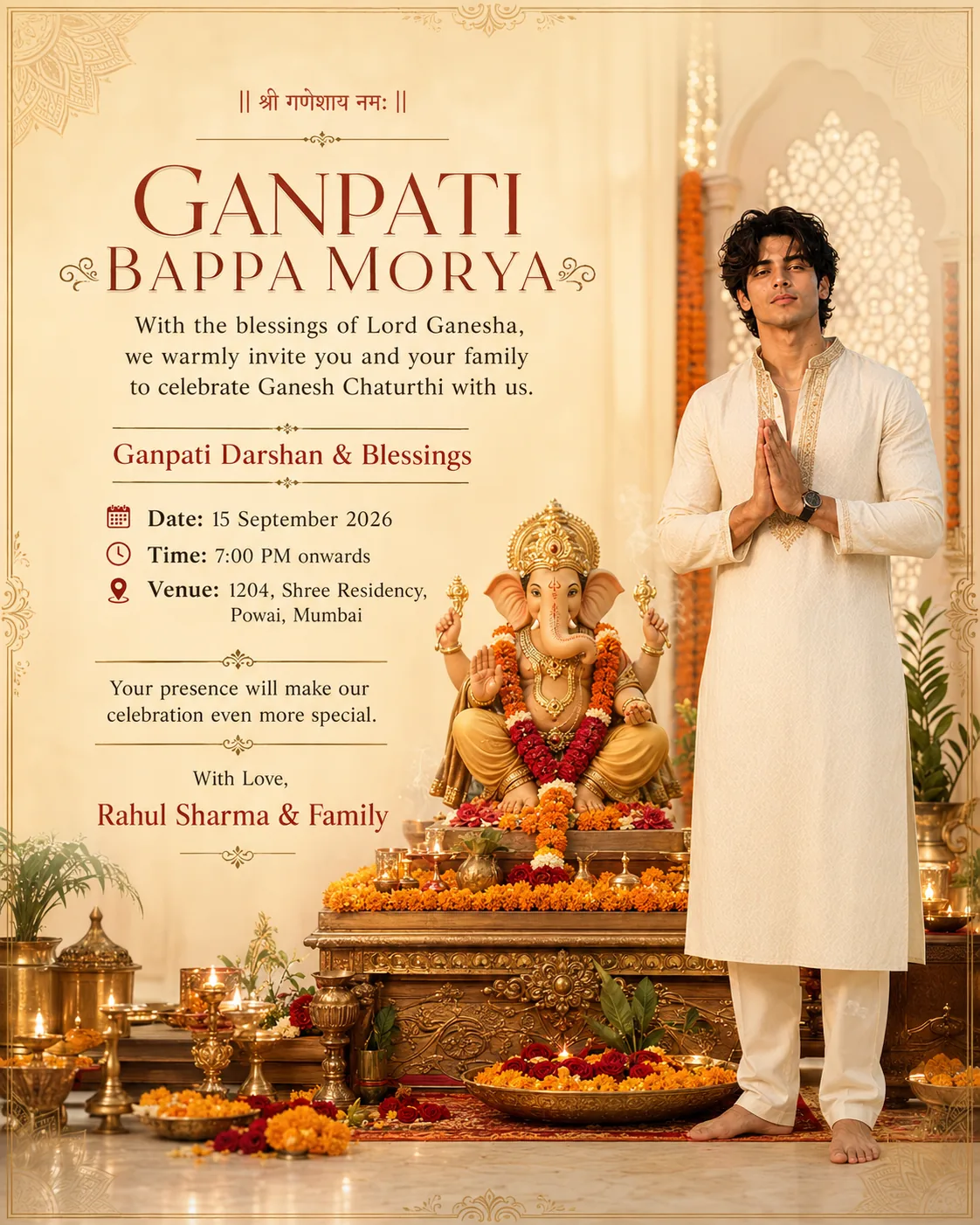
Ganpati invitation card
Not a portrait — a 4:5 Ganesh Chaturthi invite with your face, and your date, time and venue typeset on it.
Copy the prompt →
Ganesh half-face — split with idol
A tight 9:16 close-up: half your face cheek-to-cheek with a decorated Ganpati idol. The trending split-face Ganesh look.
Copy the prompt →
Curtain hairstyle poster
See yourself in a medium curtain haircut — a 4-view grooming poster, front, side and back.
Copy the prompt →More on the way — we add each new trending prompt to this page as it lands. Browse the full set any time in the AI photo prompts library.
How to use these prompts (ChatGPT or Gemini)
- Open the prompt. Tap any card above and hit Copy prompt on its page.
- Open your AI tool. Use ChatGPT in image mode, Google Gemini or Nano Banana.
- Paste and attach your photo. Paste the prompt, then add one clear, front-facing, well-lit photo of your face as the reference.
- Generate. Send it. You get the trending look with your own face. Re-run once or twice for the best version.
Tips for a result that actually looks like you
- Use a sharp, front-lit photo — the identity lock only works if the AI can read your face clearly.
- Do not add "make me look better" or "smooth skin" — that is what pulls the face away from the real you.
- If it adds a beard you do not have, type "no beard" at the end; if it changes your hair colour, add "keep my natural hair colour."
- Match the ratio to the prompt, not to a habit. These looks are not one shape: 4:5 for the invitation card and the curtain poster, 2:3 for the saree portrait and the all-black suit, 9:16 for the crimson overcoat and the Ganesh half-face. The five retro film scenes name no ratio at all — they ask you to pick a vertical shape, the tallest your tool offers in four of the five. Set it in the prompt rather than cropping afterwards.
Want a new hairstyle instead of a new background?
Most of these prompts restyle your hair as part of the era they put you in; one is built around the haircut itself. The 1980s prompt reimagines your hair, clothing, accessories and surroundings together, so the haircut arrives as part of a 1985 look rather than as the point of it. The curtain hairstyle prompt is the one built for the cut itself: it applies a medium curtain hairstyle and lays it out as a four-view poster — a hero portrait plus front, side and back — so you can see the cut before you commit at the barber. Then you can learn the real cut in the curtain haircut guide and check what suits you with the free face-shape finder.
Browse everything in the AI photo prompts library, or explore the full men's hairstyles collection.