← AI prompts · Trending · Ganesh Chaturthi

Ganpati Bappa invitation card AI prompt

A premium 4:5 Ganesh Chaturthi invitation card — a divine Ganpati idol, marigolds and diyas, you in a cream kurta with your own face, and your date, time and venue in clean gold typography. Copy the free ChatGPT & Gemini prompt below.
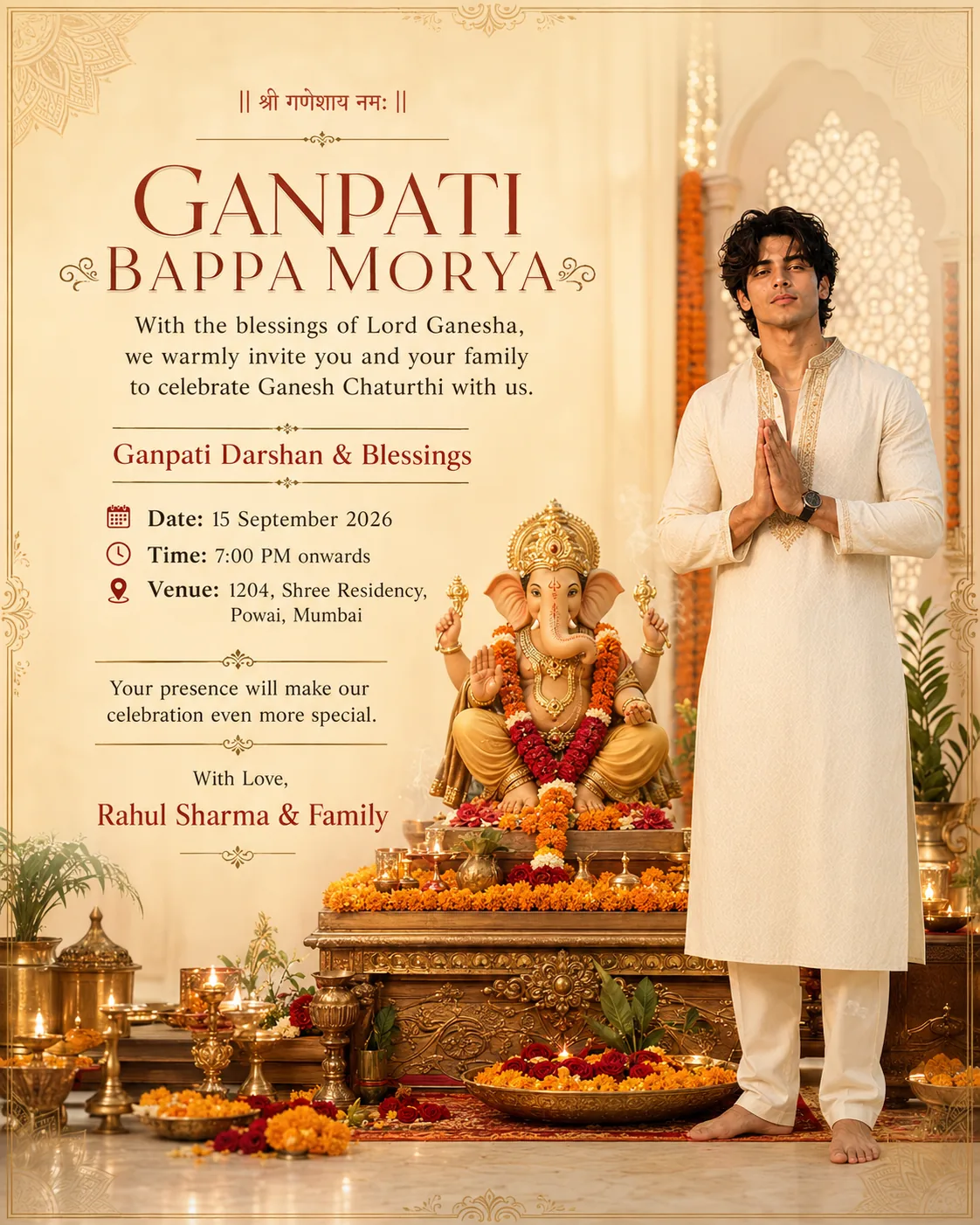
Ganpati Bappa invitation card made with an AI prompt — a decorated Lord Ganesha idol with marigold flowers and diyas, a man in a cream kurta beside it, and gold invitation typography with date, time and venue
Made with the prompt below — a 4:5 invitation card that keeps your real face beside the Ganpati setup.

Before you paste it: the date, time, venue and family name in the prompt are placeholders. Replace all four with your own details, or the card will invite people to an address that isn't yours.

Ganesh Chaturthi 2026 falls on Monday, 14 September 2026.

Create a premium Ganpati invitation poster in 4:5 portrait aspect ratio, designed for a Ganesh Chaturthi celebration at home. Use my uploaded face photo as the exact facial reference. Preserve my real identity, facial structure, skin tone, hairstyle and natural features accurately. Do not overly beautify or change my face. Make me look elegant, confident, warm and naturally photogenic. VISUAL CONCEPT Create a luxurious, devotional, sophisticated Indian festive invitation with a clean professional editorial design — elegant rather than overcrowded. Place a beautiful and divine Lord Ganesha idol as the spiritual centerpiece, decorated tastefully with fresh marigold flowers, roses, traditional diyas, subtle incense smoke and soft festive decor. Include me naturally in the composition, wearing an elegant traditional Indian outfit such as a premium cream / off-white kurta with subtle gold embroidery, standing respectfully beside the Ganpati setup with a welcoming expression and a traditional namaste pose. The environment should feel like a beautifully decorated upscale Indian home during Ganesh Chaturthi. DESIGN STYLE Luxury Indian invitation design. Modern and traditional fusion. Minimal yet grand. Premium editorial photography. Sophisticated festive aesthetic. Symmetrical and balanced composition. Lots of clean breathing space. Fine Indian decorative motifs. Subtle mandala or ornamental border details. Soft floral elements. Elegant gold accents. No cheap-looking graphics, no excessive decoration, no clutter. COLOR PALETTE Ivory / warm cream background, elegant saffron and muted red accents, rich marigold orange, subtle emerald green details, premium antique gold highlights. Use warm cinematic lighting with a soft golden glow coming from the diyas and ambient temple-style lighting. INVITATION TYPOGRAPHY Keep the typography extremely clean, luxurious and readable. At the top, elegantly write: || श्री गणेशाय नमः || Main heading: GANPATI BAPPA MORYA Subheading: With the blessings of Lord Ganesha, we warmly invite you and your family to celebrate Ganesh Chaturthi with us. Then beautifully display: Ganpati Darshan & Blessings Date: [YOUR DATE — e.g. Monday, 14 September 2026] Time: [YOUR TIME — e.g. 7:00 PM onwards] Venue: [YOUR FLAT / HOUSE NUMBER, BUILDING, AREA, CITY] At the bottom: Your presence will make our celebration even more special. With Love, [YOUR NAME] & Family COMPOSITION RULES Keep my face clearly visible and realistic. Ganpati should remain divine, respectful and visually prominent. Do not cover my face or the Ganpati idol with typography. Keep all text inside safe margins for the Instagram 4:5 format. Typography must look professionally typeset, not AI-generated or distorted. Maintain a clear visual hierarchy between heading, invitation details and imagery. Leave sufficient negative space around the text. Use realistic flowers, diyas, clothing, jewellery and decorations. Hands and fingers must be anatomically correct. No duplicate objects or people. The final result should look like a high-budget, professionally art-directed luxury Indian festive invitation campaign, photographed with a high-end full-frame camera and designed by an elite Indian branding studio. Aspect ratio: 4:5 portrait. Suggested size: 1080 x 1350 px or higher. Photorealistic, cinematic, premium, extremely detailed, elegant, clean, devotional and sophisticated. NEGATIVE PROMPT altered identity, different person, face swap artifacts, changed facial proportions, beautified face, plastic skin, excessive skin smoothing, changed eye shape, changed nose, changed lips, changed jawline, distorted facial features, extra fingers, fused fingers, malformed hands, incorrect anatomy, duplicate people, duplicate idols, malformed Ganesha idol, extra arms, distorted trunk, broken tusk, illegible text, misspelled text, garbled Devanagari, distorted lettering, overlapping text, text over the face, text over the idol, cluttered layout, cheap clipart, plastic-looking flowers, oversaturated colors, harsh flash lighting, watermark, logo, low resolution SETTINGS FOR MAXIMUM FACE PRESERVATION Use image-to-image or reference-image editing, not text-only generation. - Keep denoise or transformation strength around 0.15-0.30. - Set identity / reference strength high, around 80-95%, where supported. - Mask or protect the face and hairline; generate only the scene, outfit, decor and typography. - Disable automatic face enhancement, beauty filters and skin smoothing. - If the lettering renders badly, regenerate with the line "Do not generate any text or lettering anywhere in the image" and typeset the invitation wording afterwards in Canva.

About this prompt

This one is different from the other Ganesh prompts on this site. The Ganpati Bappa portrait and the half-face split are both photos of you. This is an invitation card — something you send to people, with a date, a time and an address on it.

So the prompt is built around two things the portrait prompts don't need: a layout with real typographic hierarchy (heading, invitation copy, event details, sign-off) and enough negative space that none of it lands on your face or on the idol. It is set to 4:5 portrait because that is the tallest ratio Instagram shows uncropped in the feed, and it forwards cleanly on WhatsApp.

How to use it

  1. Replace the four placeholders first — date, time, venue and your family name. This is the step people skip.
  2. Tap Copy prompt above.
  3. Open ChatGPT (image generation), Google Gemini or Nano Banana in image-to-image / reference mode, paste the prompt, and attach one clear, front-facing, well-lit photo of your face.
  4. Generate at a 4:5 portrait ratio, 1080 × 1350 px or larger.
  5. Check every line of text before you send it — see the note below.

If the text comes out wrong

It probably will, at least once. AI image models still render long passages of text unreliably, and the Devanagari line — || श्री गणेशाय नमः || — is the hardest thing on the card to get right. A misspelt invitation is worse than no invitation, so check the date, the time and the address character by character before sending.

The reliable fix is to stop asking the model to typeset at all. Regenerate with the line "Do not generate any text or lettering anywhere in the image", which gives you a clean decorated card with empty space where the wording should go, then add the text in Canva or any editor. You get an AI-generated background with perfectly typeset details — and you can re-use the same background for every year by changing the date.

Tips for the best result

  • Use image-to-image with a low transformation strength (0.15–0.30) and identity strength high — this is what keeps your face yours.
  • Turn off any beautify or smoothing option.
  • Ask for the namaste pose only if your reference photo has both hands visible; otherwise the model invents hands, and hands are where AI images fail most obviously.
  • Keep the venue on one line if you can. Long addresses wrap unpredictably and are the most common place the layout breaks.
  • Generate two or three times and pick the cleanest layout — it is far quicker than trying to correct one bad result.

Want a portrait instead of a card? Try the Ganesh Chaturthi Ganpati Bappa prompt or the Ganesh half-face split prompt. There is also a Mahadev (Lord Shiva) prompt in the same devotional style. See every look in the Instagram trending AI photo prompts roundup, or browse the full AI photo prompts library.

Deciding what to actually wear for the day? Our kurta picks and the dress codes guide cover festive Indian wear.

Frequently asked questions.

What is the Ganpati invitation card AI prompt?
It is a copy-paste AI image prompt that creates a premium 4:5 portrait Ganesh Chaturthi invitation card. It places a decorated Lord Ganesha idol as the centrepiece with marigold flowers, diyas and gold accents, includes you in a traditional kurta beside the setup using your own uploaded face, and lays out your date, time and venue in clean editorial typography. You replace the placeholder details with your own before generating.
How do I make a Ganpati invitation card in ChatGPT?
Copy the full prompt from this page, replace the placeholder date, time, venue and family name with your own, then paste it into ChatGPT with image generation and attach one clear front-facing photo of yourself. Generate at a 4:5 portrait ratio. For the closest likeness, use image-to-image or reference-image mode with a low transformation strength so only the scene is built and your face is preserved.
When is Ganesh Chaturthi in 2026?
Ganesh Chaturthi 2026 falls on Monday, 14 September 2026. If you are sending invitations, aim to share them one to two weeks ahead so guests can plan around the darshan timing you choose.
Why does the text on my AI invitation card come out wrong?
AI image models still render long text unreliably, and Devanagari script such as the || श्री गणेशाय नमः || line is the hardest of all. If the typography comes out distorted, generate the card without any text using the no-text variation noted on this page, then add the wording afterwards in Canva or any editor. That gives you perfectly typeset text over an AI-generated background.
What size should a Ganpati invitation card be?
Use 4:5 portrait at 1080 by 1350 pixels or larger. That is the tallest ratio Instagram shows in full on the feed, so nothing gets cropped, and it also reads well when forwarded on WhatsApp. Keep all text inside safe margins so the date, time and venue are never clipped.
Is this Ganpati invitation card prompt free?
Yes, the prompt is free to copy and use. You need an AI image tool such as ChatGPT, Google Gemini or Nano Banana and one clear photo of yourself. There is nothing to buy.

Keep going

More trending AI photo prompts.

Copy-paste prompts blowing up on Instagram — all free, all keep your face.