The short version: for a WhatsApp status, a Story or a Reels cover, use the half-face split at 9:16. For something quieter and seated, use the Ganpati saree portrait at 2:3, or at 4:5 if it is going in the feed. And if you are hosting, the invitation card is not a portrait at all — send it one to two weeks before the 14th.
Every September the same thing happens on Indian Instagram. Somebody posts a photo of themselves beside an enormous Ganpati idol in a mandap that does not exist, it takes off, and for the next ten days everyone is hunting for the prompt. This year the hunt starts earlier than usual, because Ganesh Chaturthi 2026 lands on Monday, 14 September and the ramp has already begun.
Timing is the part most people get wrong, and it is not about the prompt at all. A festival photo has a short shelf life: a Ganpati portrait posted on the 12th reads as anticipation, the same photo on the 14th reads as celebration, and on the 28th it reads as an afterthought. The ten-day Ganeshotsav ends with visarjan on Anant Chaturdashi, Friday, 25 September 2026 — though plenty of households keep Bappa for a day and a half, three, five or seven days instead, so your own immersion day may fall well before that. Work out your own dates first, then decide which photos you actually need. Usually it is three: one for sthapana day, one somewhere in the middle around an aarti, and one for visarjan.
Which Ganpati prompt should you use?
All three prompts below are identity-preserving, all three are free, and all three run in ChatGPT, Google Gemini or Nano Banana on a phone. The difference is what they are for. Read this list before you copy anything, because switching prompts halfway is much easier than fighting the wrong one.
- You want a status or a Reels cover. Go to the half-face split. It is built for 9:16 and it fills the frame edge to edge, so nothing important lands near a crop line or under the Instagram UI — and it deliberately leaves a small clear area near the top for a caption you typeset afterwards.
- You want something quieter and seated. The Ganpati saree portrait is the one where you sit an arm's length from the murti rather than pressed against it, with a deliberate gap held open between you and a gaze that actually lands on the idol's eye. It is written for 2:3, and its own page spells out the 4:5 swap for a feed post: change the ratio, keep Ganpati Ji's full crown and your whole head inside the frame, and cut the blurred foreground diyas down to one or two.
- You want that seated portrait in a kurta. Same page, three swapped paragraphs and nothing else — a midnight-navy silk kurta with an antique-gold band collar, a thin red tilak and a plain gold kada instead of the jewellery, short neatly styled hair with your real hairline and beard kept — with the gaze line left untouched, because that line is the whole image.
- You are hosting and people need to know when to come. That is the invitation card, and it is not a photograph. It is a designed 4:5 card with your date, time and venue on it. Send it one to two weeks ahead so guests can plan around your darshan timing.
The three Ganpati prompts

Ganpati saree portrait
Seated beside Bappa in a midnight-navy saree, an arm's length away, with your eyes meeting the idol's eye across the gap. A quiet 2:3 seated portrait.
Copy the prompt →
Ganesh half-face split
The opposite of the saree portrait: a tight 9:16 close-up with half your face cheek-to-cheek against the idol and almost no background at all.
Copy the prompt →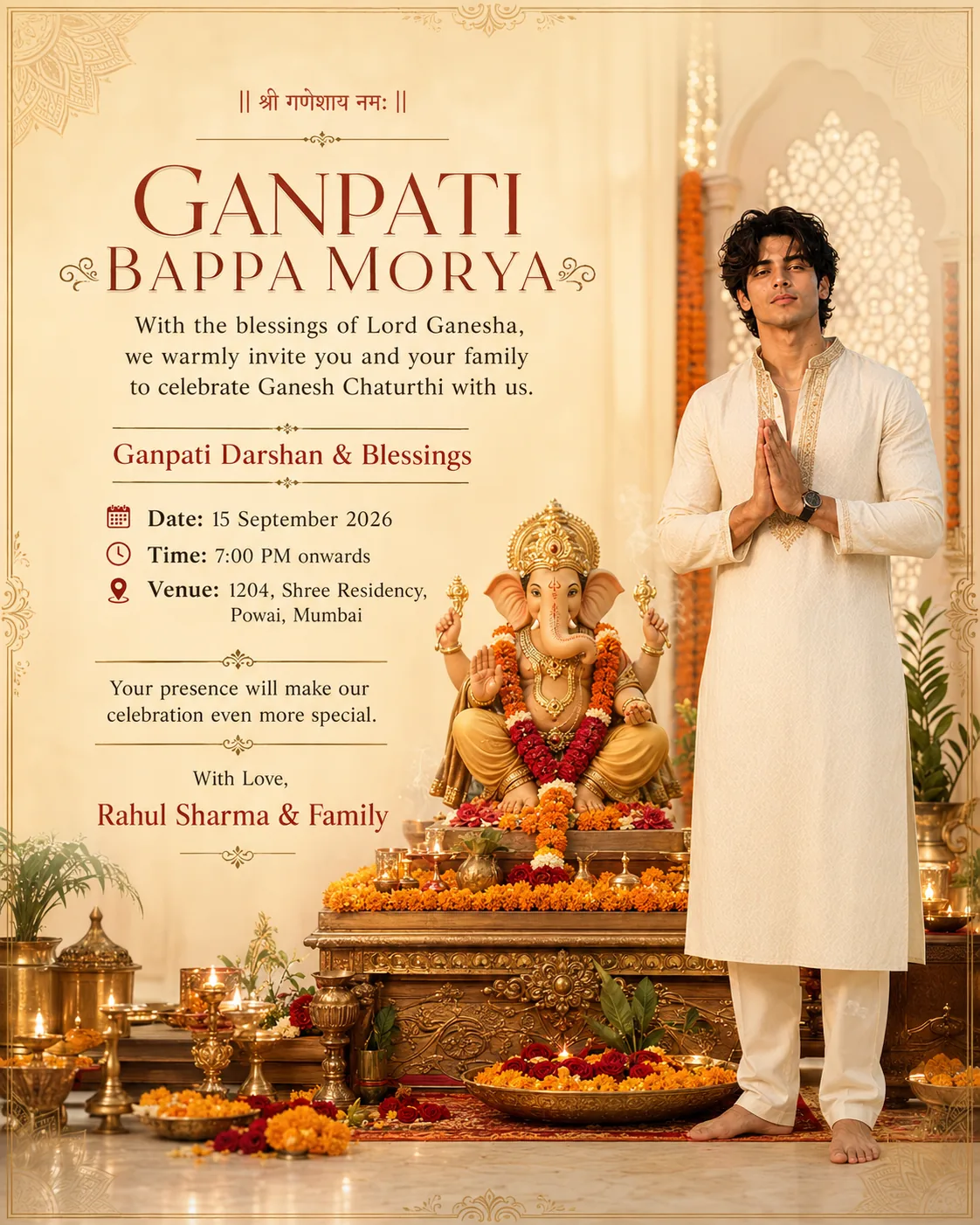
Ganpati invitation card
Not a portrait — a 4:5 invite you actually send, with your face on it and your date, time and venue typeset in gold beneath.
Copy the prompt →Each card opens the full prompt with a one-tap copy button. For every trending prompt on the site — festival and otherwise — see the Instagram trending AI photo prompts roundup.
The four things that go wrong in every Ganpati AI photo
These prompts differ enormously in composition and not at all in how they fail. If your result is disappointing, it is almost certainly one of these four, and three of them are fixed before you ever press generate.
The face stops being yours. When this happens the prompt is rarely the culprit — the attachment is. A model reads identity from the reference photo, so a group shot, a sharp side profile, a beauty-filtered selfie or a dim indoor picture gives it very little to hold onto and it quietly invents the rest. Attach one clear, evenly lit, unfiltered, front-facing photo. None of the three tools named on this page — ChatGPT, Gemini, Nano Banana — gives you a dial for any of this: there is no transformation-strength, identity-strength or beautify control to set, so everything has to be done in words. Tell it to keep your face exactly as in the uploaded photo, name your real hairline, beard and skin texture as things to preserve, and say plainly that the face must not be smoothed, slimmed or brightened. It also pays to check the photo itself, since a selfie shot with your camera's own beauty mode arrives pre-smoothed and hands the model less to work from. And never add "make me look better" to a festival prompt; that single phrase does more damage than everything else combined.
The whole image turns orange. Festival scenes are stacked with warm signals — marigolds, saffron silk, brass diyas, golden hour, incense haze — and once a model has committed to a warm scene it tends to pull every surface in the frame toward that warmth rather than holding each object to its own colour. So your navy saree comes back brown, a cream kurta comes back beige-orange, and the picture loses all its contrast. The fix is to say what the warm light is allowed to touch: name the flowers, the diyas and the murti as the warm elements, then state that your garment must stay its own colour inside a warm scene. Asking for less warmth overall does not work; it just kills the diya flames that made the scene worth generating.
The hands come apart. A namaste at chest level and a hand holding an aarti thali are the first places to zoom in on, because joined palms and gripped objects are exactly where generators produce fused fingers, a sixth knuckle or a forearm entering from nowhere. Two things help. Keep hands away from the face rather than across it, and say where a supporting arm rests instead of leaving it floating — an elbow on a visible knee, or a forearm on a seat arm just outside the frame. If the hands still come out wrong, regenerate rather than trying to describe the problem to the model.
The murti itself comes out malformed. A trunk that snaps off mid-curve, forks into two, or floats free of the face, melted crown detail, a fifth arm, or four arms where one of them does not attach to a shoulder. The curve itself is not the fault — Ganesha is Vakratunda, the curved-trunked, and a bent trunk is the correct form, not a glitch. And then the one almost nobody thinks to check: the tusks. Ganesha is Ekadanta, the one-tusked — the second tusk is broken by design, snapped off in the telling so it could be used to write the Mahabharata. So a murti that comes back with two matching, unbroken tusks is not a clean render. It is the iconographic error, and it is the one most likely to get past you, because it looks neat. One catch if you are using the invitation card prompt: the words broken tusk sit in its negative prompt, so delete those two words from that list before you run it, or you are asking the model to suppress the canonical form. This whole category matters more than the other three, and it is worth being unambiguous about: a distorted deity is not a funny AI glitch to post with a laughing caption, and it is the one failure here with a real chance of offending the people who see it. So before anything leaves your phone, check the trunk (curved, whole, joined to the face), the tusks (one whole, one broken short), the crown, and the arms — four of them, each one joined to a shoulder. Regenerate if any of that is off. Naming the iconography in the prompt leaves the model less to invent — a four-armed seated murti, one whole tusk and one broken, the trunk curving toward a modak, the mushak at the base, marigold garlands, a crown — because a model left to fill the gaps itself hands you a generic calendar-art Ganesha rather than the murti you meant.
Putting Bappa in an AI image, honestly
It is worth saying plainly, because a lot of people hesitate before generating one of these and never quite ask the question out loud. A festival portrait beside a murti is not very different from a photo taken at a pandal — the register is what decides it. Keep the murti whole and upright; be the devotee in the frame rather than the co-star; never merge your own features into the deity's or ask for "your face as Ganesha"; and do not pass an invented setting off as somewhere you actually went. The mandap in these prompts is generated and everybody understands that — the line is crossed in the caption, when a made-up pandal becomes a shrine you claim to have visited, or a ritual or a miracle you claim happened. The usual rule about height — keep the murti at or above your own eye level, and larger in the frame than you are — holds in any composition wide enough to show scale, which here means the seated saree portrait: it keeps Bappa upright and elevated, never at foot level, dominating the left third while you sit to the right. It does not survive the half-face split, and that is worth admitting rather than quietly stepping around: that prompt is a symmetrical close-up, so the two halves come out equal in scale and level with each other by design. If that sits badly with you, the seated portrait will do the same job. If you do use it, everything else has to carry more weight — the idol rendered whole and cleanly, nothing blended across the seam, and no caption that invites anyone to read the two sides as one face. Label the picture as AI-generated when you post it, so nobody mistakes it for a photograph taken at a pandal. And if the idol renders badly, regenerate. That last one is the whole of it, really: the same care you would take with a photo of your own family's murti, applied to a picture a model drew for you. An AI image is a festival photo. It is not darshan, and it is not puja.
How to run any of these prompts
- Open the prompt page from a card above and tap Copy prompt.
- Open your tool — ChatGPT in image mode, Google Gemini or Nano Banana. All three handle these prompts and all three run on a phone.
- Paste, then attach one photo of your face. One photo, clear, front-facing, evenly lit, no filter. If you also attach a composition reference, label them: "Image 1 is my face, identity reference only. Image 2 is a composition reference only."
- Set the ratio deliberately. 9:16 for a WhatsApp status, a Story or a Reels cover; 2:3 for the saree portrait as it is written; 4:5 for the invitation card, or for the saree portrait taken to an Instagram feed post. Ask for it in the prompt rather than cropping afterwards, or you will lose the crown or your own chin.
- Check the idol, then post. Trunk, tusks, arms, crown, hands. Regenerate if any of them is wrong.
What to wear, and what to caption it
Only the invitation card puts you in a cream kurta — a premium cream or off-white one with subtle gold embroidery — which is a sound default and also the reason so many Ganpati posts look identical; the seated portrait's kurta swap goes the other way, to midnight navy. If you are photographing a real pandal visit rather than generating a portrait, September in most of India is still humid, so the fabric matters more than the colour: cotton or a cotton-silk blend, a kurta ending around mid-thigh, and something below that is not black. Saffron, cream, off-white, sage and deep maroon all photograph well in the mixed daylight and diya light of a pandal, and they hold up under the warm cast that afternoon light throws onto everything. Our kurta guide covers length and pairing in more detail, and there are more festive combinations in the outfits section.
For captions, the two standard chants both have a correct time and place. Ganpati Bappa Morya, Mangalmurti Morya is what follows the aarti, so it suits a sthapana or mid-festival post. Ganpati Bappa Morya, Pudhchya Varshi Lavkar Ya — "come again early next year" — belongs to visarjan and nowhere else. Getting them the right way round reads as knowing the festival. Getting them backwards reads as a content farm. If you want the chant burned into the image, generate the picture with no text at all and typeset it afterwards — short English lettering these tools now handle reasonably well, but Devanagari matras and conjuncts still collapse far too often to trust.
One more thing worth planning for: the days after sthapana. Aarti, pandal-hopping and visarjan photos carry the whole stretch to Friday, 25 September. Visarjan is the hardest photograph of the festival to get, and not for any technical reason — it is the farewell, everyone around you is saying Pudhchya Varshi Lavkar Ya, and nobody in that moment is thinking about a camera, least of all you. Which is exactly why the prompt for it wants to be sitting in your notes days before, not opened on the riverbank. Save one for visarjan rather than spending everything on day one.
For the wider set of looks — festival and everyday — see the Instagram trending AI photo prompts roundup, or browse everything in the AI photo prompts library.